You can't hear it when it's right: compression from the first knob to the mix bus
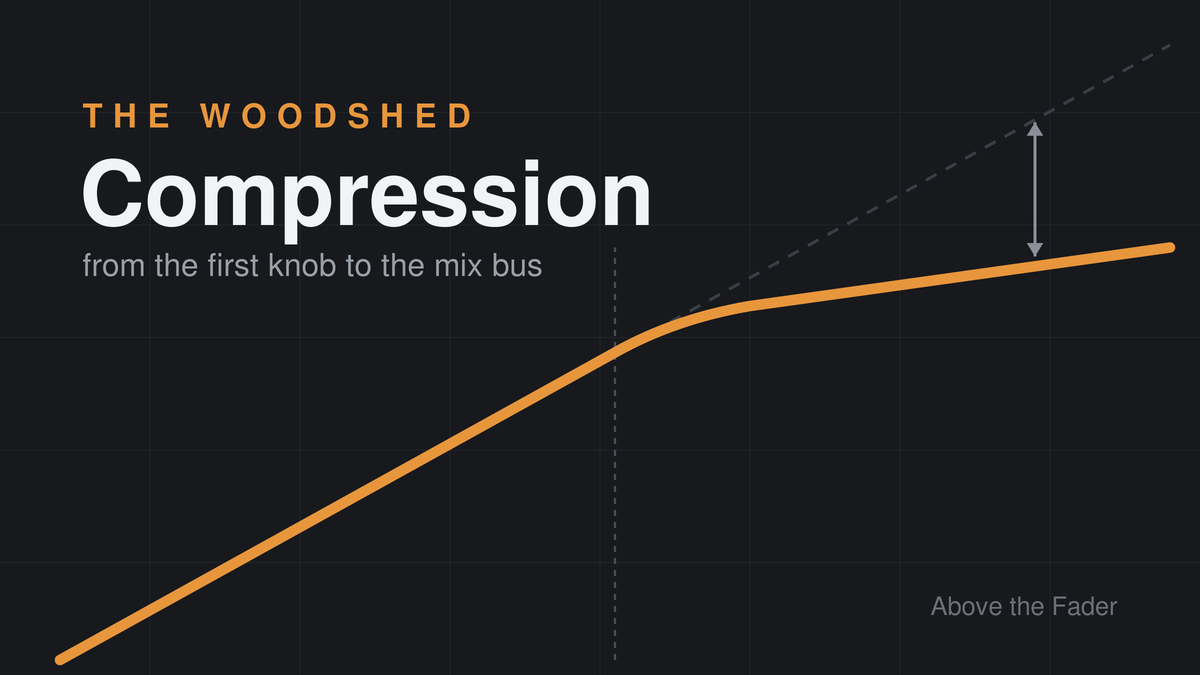
The Woodshed. Weekly long-form, July 2026. For anyone on the crew who owns a threshold knob.
Compression is the most-used and worst-understood processor in live sound. Every channel strip has one. Most engineers learned it by copying a screenshot of someone else's settings, and a lot of working mixes prove it. The tell is always the same: a vocal that sits perfectly for the ballad and disappears when the band comes up, a kick with no beater left, an IEM mix that makes the singer push until they're hoarse by song six.
This piece is the whole subject in one sitting, structured so you can drop in at your level. If you've never been sure what attack actually does, start at the top. If you know your onions and want the bus compression and multiband material, skip to the back half. If you mix monitors, there's a section written for the specific ways compression will hurt you that it won't hurt FOH.
One promise up front: real numbers throughout. Settings are starting points, not gospel. But "set the attack by feel" is how we got a generation of engineers who set the attack by fear.
The five knobs and what they actually do
A compressor is an automatic fader. That's the entire concept. When the signal crosses a level you choose, the compressor pulls the fader down by an amount you choose, at a speed you choose, and lets go at a speed you choose. Everything else is flavor.
Threshold is the level where the compressor starts working. Below it, nothing happens. Above it, gain reduction begins. Lower threshold, more of the signal gets touched.
Ratio is how hard the fader gets pulled. At 4:1, a signal that goes 4 dB over the threshold comes out 1 dB over. At 2:1 you're gently leaning on it. At 10:1 and beyond you're limiting, which is less a musical decision and more a wall.
Attack is how long the compressor takes to reach its gain reduction once the signal crosses the threshold. This is the most consequential knob on the unit and we'll spend a whole section on it.
Release is how long it takes to let go once the signal drops back under. Get it wrong in one direction and the mix pumps. Get it wrong in the other and the compressor never recovers between hits, which turns your 4:1 into a permanent volume cut you paid for twice.
Makeup gain puts back what you took away. This is also where every A/B comparison lies to you. Louder sounds better, always, to everyone. If you bypass the compressor and the sound gets quieter, your brain votes for the compressor no matter what it's doing to the signal. Match levels before you judge.
The knee, where you have one, sets whether compression arrives abruptly at the threshold (hard knee) or fades in gradually around it (soft knee). Hard knee for drums and anything percussive. Soft knee for vocals and anything you don't want the audience to hear being processed. The dbx 160's OverEasy button is the most famous soft knee in the business and half the reason that box lived on snare drums for forty years./image
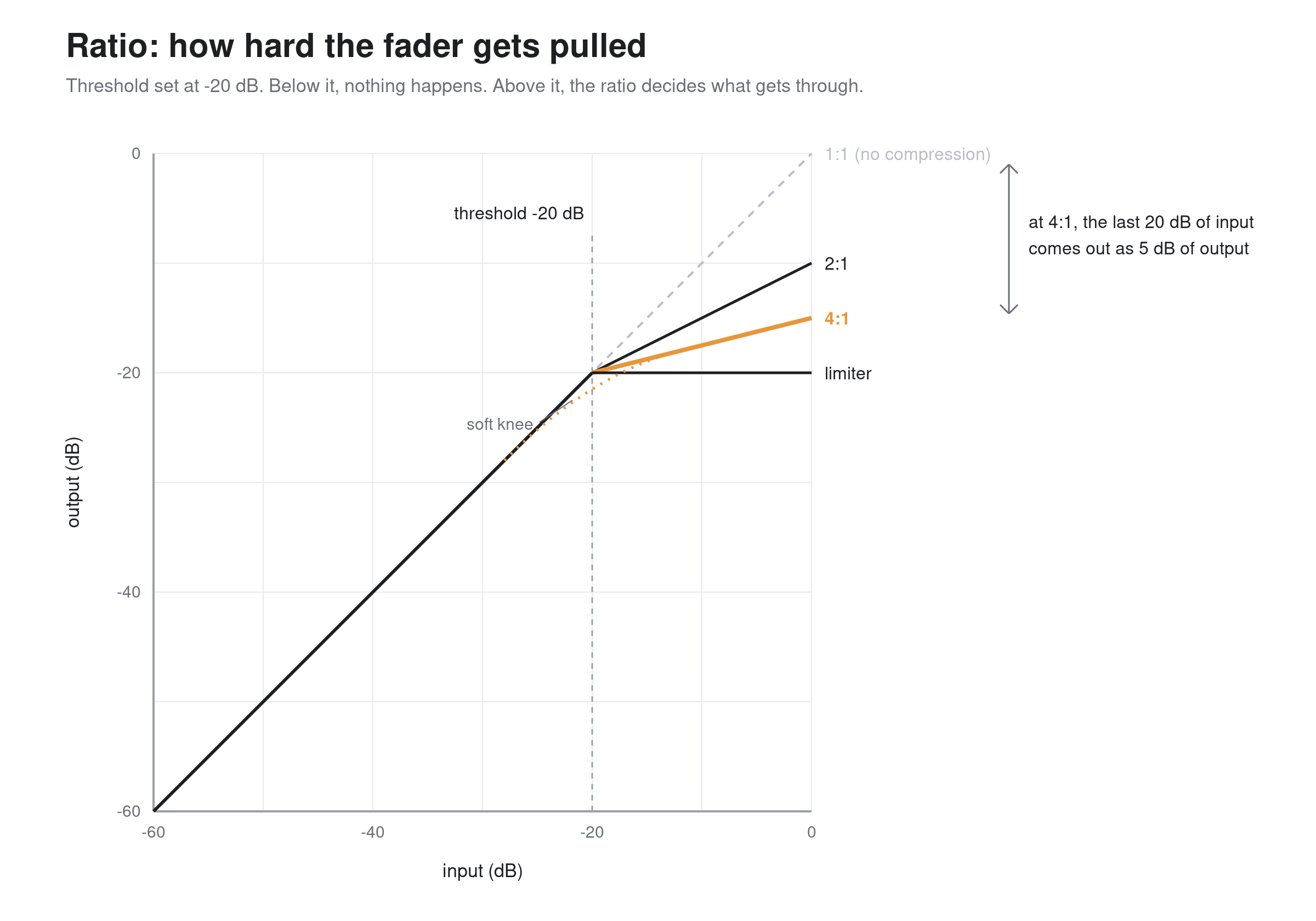
Threshold decides where the compressor starts working. Ratio decides how hard. The soft knee fades the ratio in instead of arriving all at once.
Watch the gain reduction meter, but don't mix to it. Two or three dB of reduction on the loud phrases is a working vocal setting. If the meter lives at 10 dB and never comes back to zero, you're not compressing anymore. You're running the channel quieter and paying distortion for the privilege.
Why an 1176 doesn't sound like an LA-2A
Console manufacturers spend serious DSP money modeling sixty-year-old hardware, and it's not nostalgia. The circuit that does the gain reduction determines how the compressor behaves, and the behaviors are different enough to be different tools. Four families cover almost everything you'll meet.
FET. The 1176 is the reference. Attack time down to 20 microseconds, which is functionally instant, and a sound that adds grab and forwardness even at low gain reduction. Ratios of 4, 8, 12, and 20 to 1, plus the all-buttons-in trick that turns it into a beautiful disaster. Vocals that need to cut, snare, room mics, anything that should sound like it's trying to get out of the PA. One trap for the newcomer: on the hardware and most models of it, the attack and release knobs are fastest fully clockwise. Backwards from everything else you own.
Optical. The LA-2A is the reference. The gain reduction happens in a photocell that responds slowly and releases in two stages, fast at first, then a long tail that can run seconds. You get two knobs and no attack or release control because the circuit is the attack and release. What it does to a vocal is close to what a good engineer's finger does on a fader, which is why it's lived on lead vocals since the sixties. What it won't do is catch a transient. Don't put it on drums and be disappointed.
VCA. The workhorse family, and the name trips up more live engineers than any other, so let's take the detour. A VCA is a chip: a voltage-controlled amplifier. Audio passes through it, and a separate control voltage tells it how much gain to apply. The chip doesn't care who supplies that voltage, which is exactly why you know these three letters from somewhere else on your desk. In a VCA group, the master fader passes no audio at all. It sends a control voltage to a VCA sitting in every assigned channel, turning them up and down in place. No summing, no shared bus, one fader running eight channels that never leave home. Digital desks kept the concept, and some brands renamed it DCA because nothing inside the box is a voltage anymore.
A VCA compressor is the same chip with a different boss. Instead of your finger on a group master, a detector circuit watches the audio, runs it through your threshold and ratio settings, and generates the control voltage itself. The signal rides its own fader. We said at the top that a compressor is an automatic fader; the VCA compressor is the most literal version of that sentence ever built. Same part, two jobs: in a group, a human moves the gain. In a compressor, the signal moves its own.
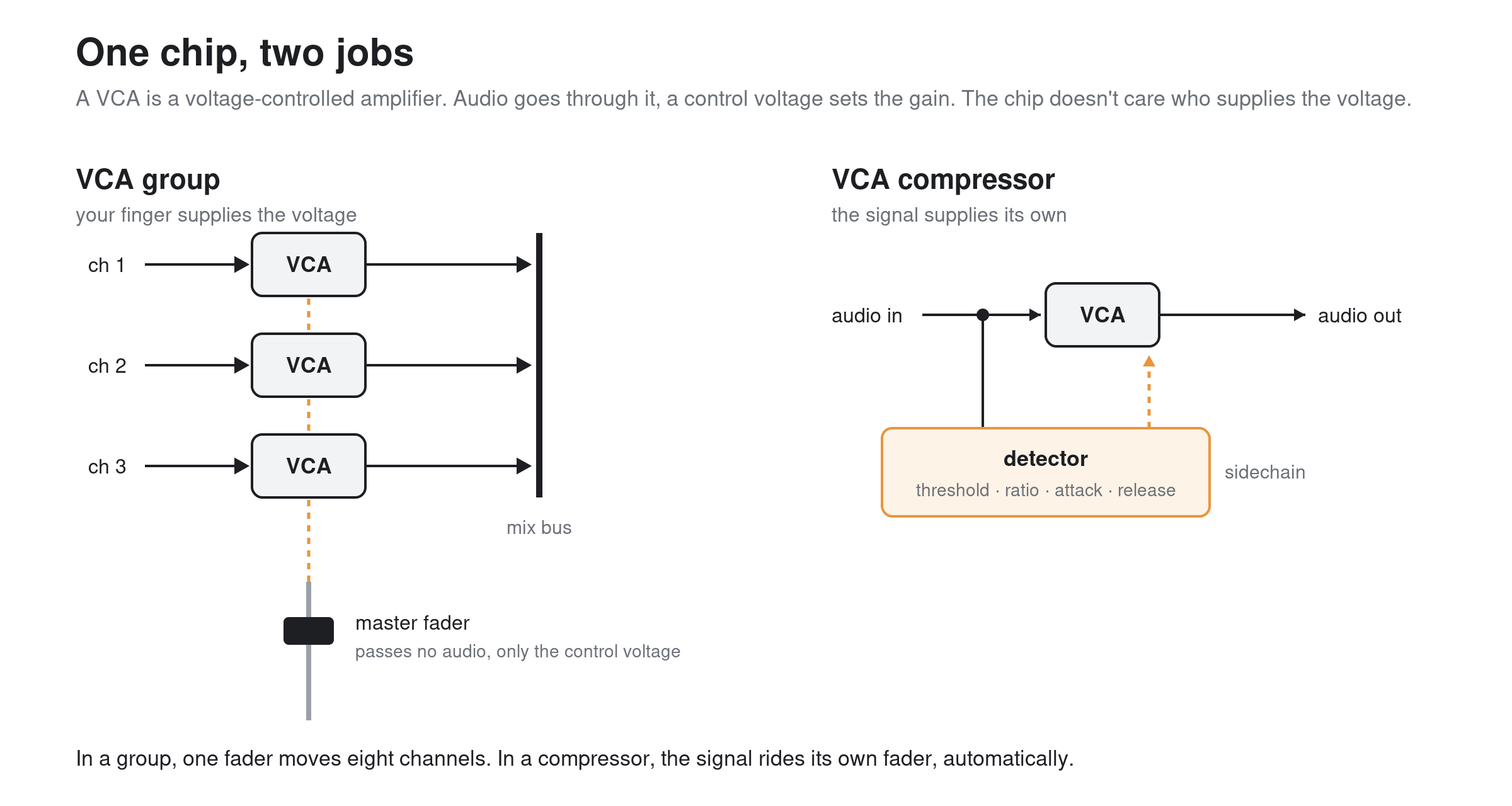
The chip doesn't care who supplies the control voltage. In a group it's your finger. In a compressor it's the signal itself.
The family history runs through David Blackmer, whose gain cell made the dbx 160 possible in the mid-seventies, and the sound is what the topology predicts: fast, clean, predictable, controllable. An opto cell has physical memory it can't be talked out of. A FET bends the signal on the way through. A VCA does what the control voltage says, across a wide range, linearly, so the knobs are the sound. dbx 160 on the insert, SSL G-series on the bus, where a quad-VCA gain cell earned that compressor its glue reputation. And nearly every stock channel compressor on every digital console behaves like an idealized VCA design, because that's what a DSP gain computer driving a multiplier is. When you want compression that does exactly what the knobs say and adds nothing, this is the family.
Vari-mu. Tube gain reduction, the Fairchild 660 and 670 being the cathedral examples. The ratio increases the harder you drive it, which makes it gentle at low levels and grabby at high ones. Glue, in a word. You'll meet it in live work mostly as a plugin on the mix bus.
The digital consoles have all taken sides. DiGiCo's Mustard strip on the Quantum range offers four compressor models including a vintage VCA and an optical type. Allen & Heath's DEEP library on dLive and Avantis has the family tree laid out in the names: Peak Limiter 76 (FET), Opto and OptTronik (optical), 16T and 16VU (the dbx and VCA lineage), Mighty (a transistor-array VCA with attitude). Yamaha's Rivage ships the U76, the Buss Comp 369, and the Portico 5043, which has a switchable feed-forward or feed-back detector, a control that deserves more attention than it gets. Avid's S6L runs AAX DSP, so the classic emulations (BF-2A, BF-3A, Purple MC77, both Fairchilds) plus Sonnox and McDSP install right into the engine, with Waves available through the SoundGrid option card.
The point of knowing the families is not gear trivia. It's that "put a compressor on the vocal" is an incomplete instruction the same way "put a mic on the guitar amp" is. Which one, doing what?
Attack and release are the whole game
Here's the mental model that makes the attack knob make sense: every drum hit, every consonant, every pick attack is a transient followed by a body. The attack time decides how much of the transient gets through before the compressor clamps. You are not setting a speed. You are choosing where to cut the sound in half.
Kick drum. The beater click lives in roughly the first 10 to 20 milliseconds. Set the attack at 20 to 30 ms and the click passes untouched while the compressor grabs the boomy tail, and the kick gets punchier as you compress it. Set the attack at 1 ms and you've sanded the click off entirely, and no amount of 4 kHz EQ afterward brings back what you threw away. A dull kick with a big EQ boost where the beater used to be is one of the most common sounds in live music and almost nobody means to make it.
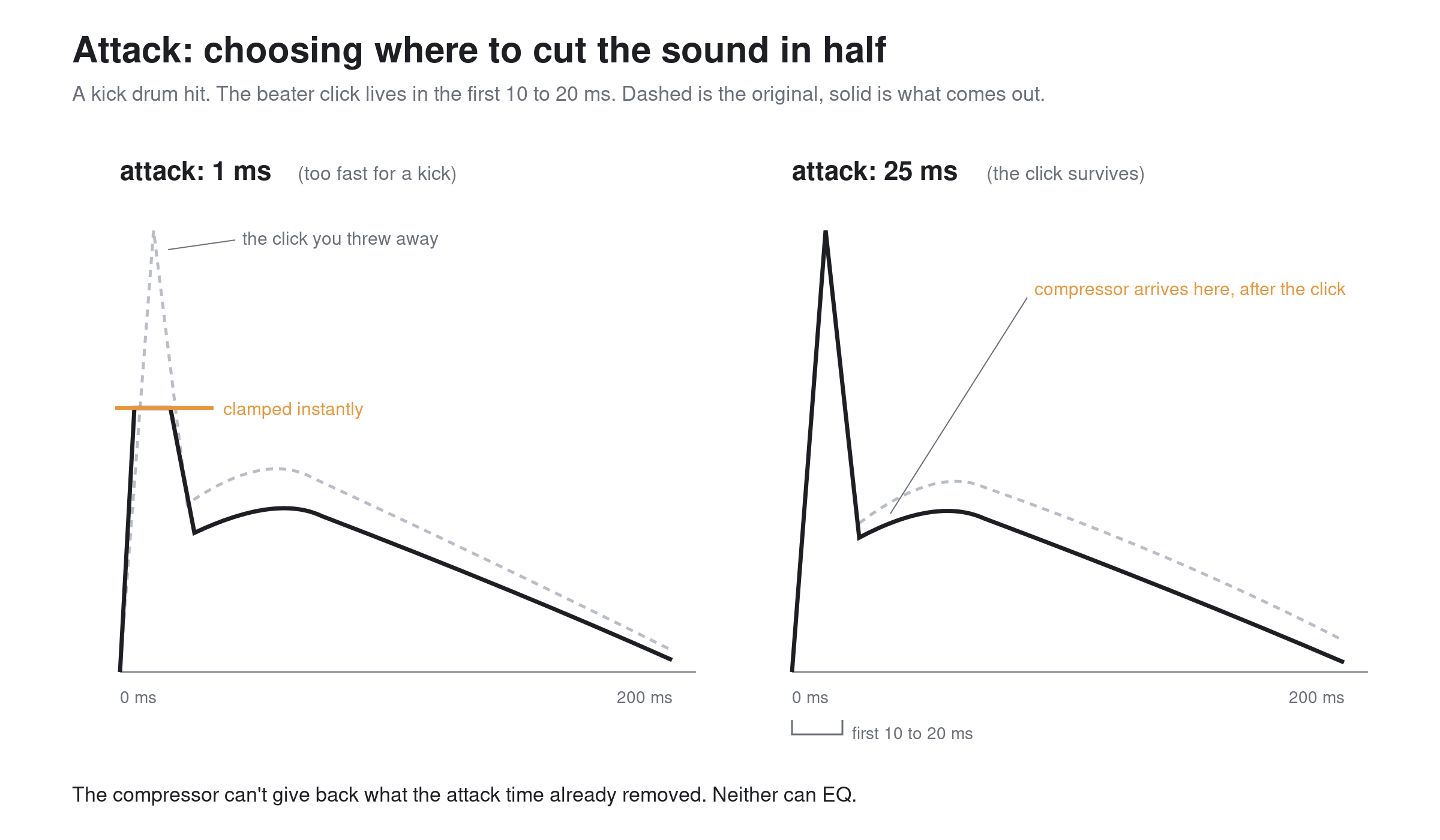
Same kick, two attack settings. The compressor can't give back what the attack time already removed.
Snare, same physics. The crack is the first few milliseconds. 10 to 20 ms of attack keeps the crack and controls the ring. Faster than 5 ms and you're mixing a cardboard box.
Vocals run the other way. There's no percussive transient you're trying to protect, and fast peaks are mostly consonants and mic handling. Attack of 5 to 15 ms, ratio around 3:1 or 4:1, threshold set so the loud phrases show 3 to 5 dB of reduction and the quiet ones show none. That's a vocal compressor doing its job. The classic serial trick is worth stealing from the studio world: two compressors doing 3 dB each instead of one doing 8. Two light stages sound like control. One deep stage sounds like compression.
Release is tempo. Set it so the gain reduction meter recovers between hits, roughly in time with the song. Too fast on anything with low end and the compressor starts tracking individual waveform cycles below 100 Hz, which is audible as distortion on bass and kick. Too slow and the first chorus hit punches a hole that the rest of the bar falls into. Auto release, where the console offers it, is not cheating. The SSL bus compressor's auto release is a large part of why that box glued twenty years of records together.
Bass guitar deserves its own line because it's the instrument compression helps most. Note-to-note level on a bass, especially with a player who moves between fingers and pick, can swing 6 to 10 dB. A 4:1 with a medium attack (10 ms or so), a release slow enough not to chew the low end (150 ms and up), and 3 to 6 dB of reduction turns the low end of the whole mix from weather into architecture.
Where compression lives in a live rig, and where it bites
Signal order first. High-pass filter before the compressor, always. Stage rumble and mic handling below 80 Hz will trip the detector all night, and the compressor will duck your vocal in time with the drummer's footsteps. If the console offers a sidechain filter on the compressor itself, use it for the same reason; a detector high-passed at 100 Hz hears the vocal, not the subs bleeding into the capsule. Gate before compressor on drums, unless you enjoy paying makeup gain to amplify floor tom bleed.
Now the live-specific warning that studio tutorials never carry: compression spends gain-before-feedback. A compressor on a vocal channel pulls the loud moments down, and then makeup gain pushes the whole channel up, which means the quiet moments, the ones where the singer steps back and the mic hears mostly wedge, are now hotter than they were. Every dB of gain reduction plus makeup is a dB of ring you've moved closer to. This is why the FOH vocal chain and the monitor vocal chain are different problems wearing the same channel strip, and why heavy vocal compression in a wedge-heavy show is how you end up hunting feedback at the exact frequency you boosted to make up for the dull kick.
Groups are where live compression gets efficient. One compressor across the drum group doing 2 or 3 dB does more musical work than six channel compressors doing 6 dB each, and it reacts to the kit as a performance instead of eight arguments. Backing vocals into a group with 3:1 across it stops the unison chorus from doubling the mix level. Same logic, horns.
The monitor world plays by different rules
FOH compresses for the audience. Monitors compress for the performer, and the performer is standing inside a feedback loop made of their own ears.
The failure mode is specific and worth understanding. A singer's IEM mix gets compressed hard, usually with good intentions, to keep everything audible. Now the dynamic relationship between how hard they sing and how loud they hear themselves is broken. They push, the compressor pushes back, and they hear no reward for the effort. So they push harder. By the back half of the set the pitch is suffering and the voice is blown, and the engineer is reaching for more compression to control the pushing, which is the disease presenting as the cure.
The working rules for ears: keep the vocal compression light, 2:1 or 3:1 with a couple of dB of reduction, enough to catch the scream and no more. Let the mix breathe dynamically, because dynamics are information the performer is using. And put the serious protection where it belongs, a limiter across the IEM mix output, set as a ceiling that's rarely hit rather than a lid that's always on. That limiter is a hearing-safety device, not a mix tool. The day a comms pop or a dropped mic hits someone's ears at full range is the day everyone agrees it was worth the insert.
Wedge mixes tolerate even less. Every dB of compression on a wedge send is gain-before-feedback spent on stage, where it's most expensive. Most of the time the honest answer for wedges is: compress less, ride more.
Bus compression, parallel, and multiband
Mix bus compression is the most copied and least examined habit in the craft. The recipe everyone knows, 2:1, slow attack (10 to 30 ms), auto release, 1 to 2 dB of reduction on the loud sections, exists because it works. The slow attack lets the drums keep their front edges. The shallow reduction means the compressor is breathing with the song instead of fighting it. What it buys you live is subtle: the mix feels finished, the quiet material sits up, and your fader moves get slightly smaller. What it costs you if you overdo it is not subtle. Three dB of reduction on the bus turns into audible pumping the moment the kick and the vocal disagree about where the beat is. If your bus compressor's sidechain can be high-passed, high-pass it, 60 to 100 Hz, so the kick stops conducting the orchestra.
Parallel compression is the drum trick that actually earns its reputation. Mult the drums to a second group, crush that copy properly (fast attack, 8:1 or the all-buttons impression of your choice, 10 dB or more of reduction), and blend it underneath the uncompressed group until the kit gets dense and powerful without losing the transients, because the dry path still carries them. Two cautions. First, level match your listening or you'll just be voting for louder again. Second, latency. The console's own paths are delay-compensated, but the moment the crushed path goes through an external server or a plugin with lookahead while the dry path stays onboard, you can end up combing the very transients you were trying to keep. If the drums get thinner as you blend the parallel path in, you don't have a taste problem, you have a phase problem.
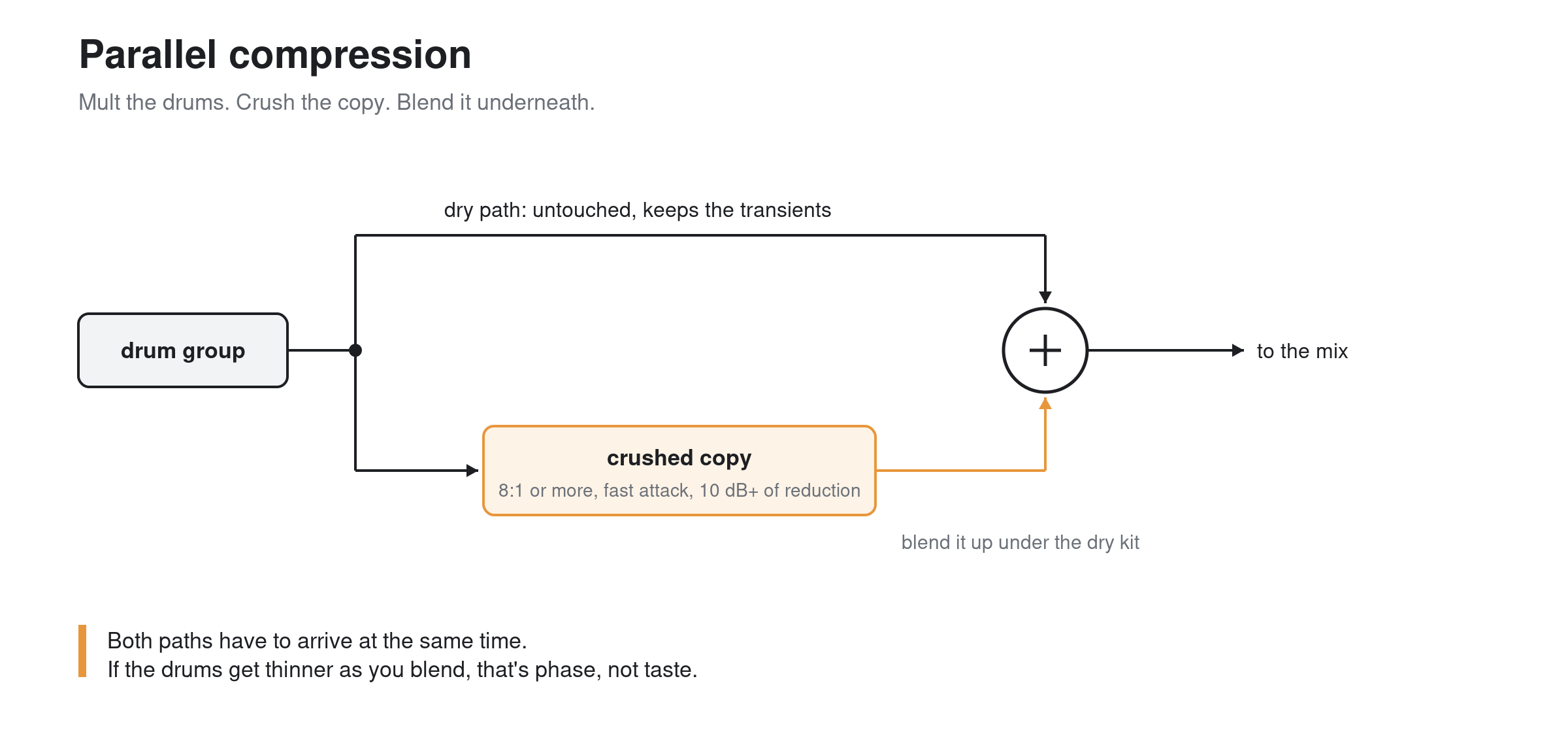
The dry path carries the transients. The crushed path carries the weight. The blend is the sound.
Multiband compression and dynamic EQ are the precision tools, and they're not the same tool. A multiband splits the signal into bands with crossover filters and compresses each band separately. Powerful, and phase-relevant, since the crossovers are doing surgery on the signal even before any gain reduction happens. A dynamic EQ is an EQ bell that only shows up when the signal in its range crosses a threshold, and it touches nothing else. Allen & Heath's Dyn8 puts four bands of each in the same insert, which is a fair summary of where console processing has landed. The honest use cases live small: a dynamic bell at 3 kHz that pulls 2 or 3 dB only when the vocal gets harsh, a band on the bass that catches the one resonant note the room falls into. If the whole mix is running through six active bands of multiband all night, the tool is mixing and you're watching.
Onboard, plugin, or the rack
The stock channel compressor on any current console at the DiGiCo, Avid, Yamaha, or Allen & Heath tier is clean, dependable, and better behaved than most of the vintage hardware it gets compared to. It runs inside the console's own processing path, adds no meaningful latency, and never crashes during the encore. For eighty percent of the channels on the desk it's the right choice, full stop.
The modeled processing earns its keep on the channels where character is the point: the Mustard strip or Peak Limiter 76 on a lead vocal, an optical model on the bass, a vari-mu flavor on the mix bus. The rule that keeps you out of trouble is to know what each insert costs. Onboard modeled strips like Mustard and DEEP are designed into the console path. External processing, whether it's a SoundGrid server or a laptop, buys you the whole plugin universe at the price of a round trip, and that price gets paid in milliseconds on paths where milliseconds matter, which in monitor world is all of them. A monitor engineer running a favorite plugin chain on a vocal that also feeds the singer's ears is adding latency to a path where the singer is listening to themselves. Bone conduction arrives instantly; the ears mix arrives late; past a handful of milliseconds the singer starts describing a "phasey" or "robotic" feeling they can't name. They're not wrong. They're doing comb filtering measurement for free.
And the rack: a hardware insert on the lead vocal still shows up on big tours, partly for sound, partly because a knob you can grab during the show is a workflow argument no plugin window wins.
A soundcheck procedure that holds up
Verse-chorus order, if you want one:
Start with everything bypassed and get the mix roughed in on faders. You can't judge what a compressor is doing to a balance you haven't built.
Set thresholds during the loud song, not the pretty one. The band's opener lies to you; ask for the biggest chorus they have. Set each compressor so it works during that and sleeps the rest of the time.
Level-match every judgment. Toggle bypass with makeup gain compensating and ask whether it's better, not bigger.
Check the quiet song before you're done. The setting that saved the chorus is now hovering under the threshold doing nothing, which is fine, or it's dragging 4 dB out of a whispered bridge, which is not.
Then walk the rig with fresh ears and listen for the two sounds of too much: pumping, which is the release fighting the tempo, and smallness, that flat, close, airless quality of a mix whose transients all went home early. Loud and small is the signature sound of over-compression, and the fix is never more compression somewhere else.
The whole discipline in one line: a compressor should be the reason nobody noticed anything. The audience hears the singer on top of every chorus and assumes the singer did it. Good. That was always the job.
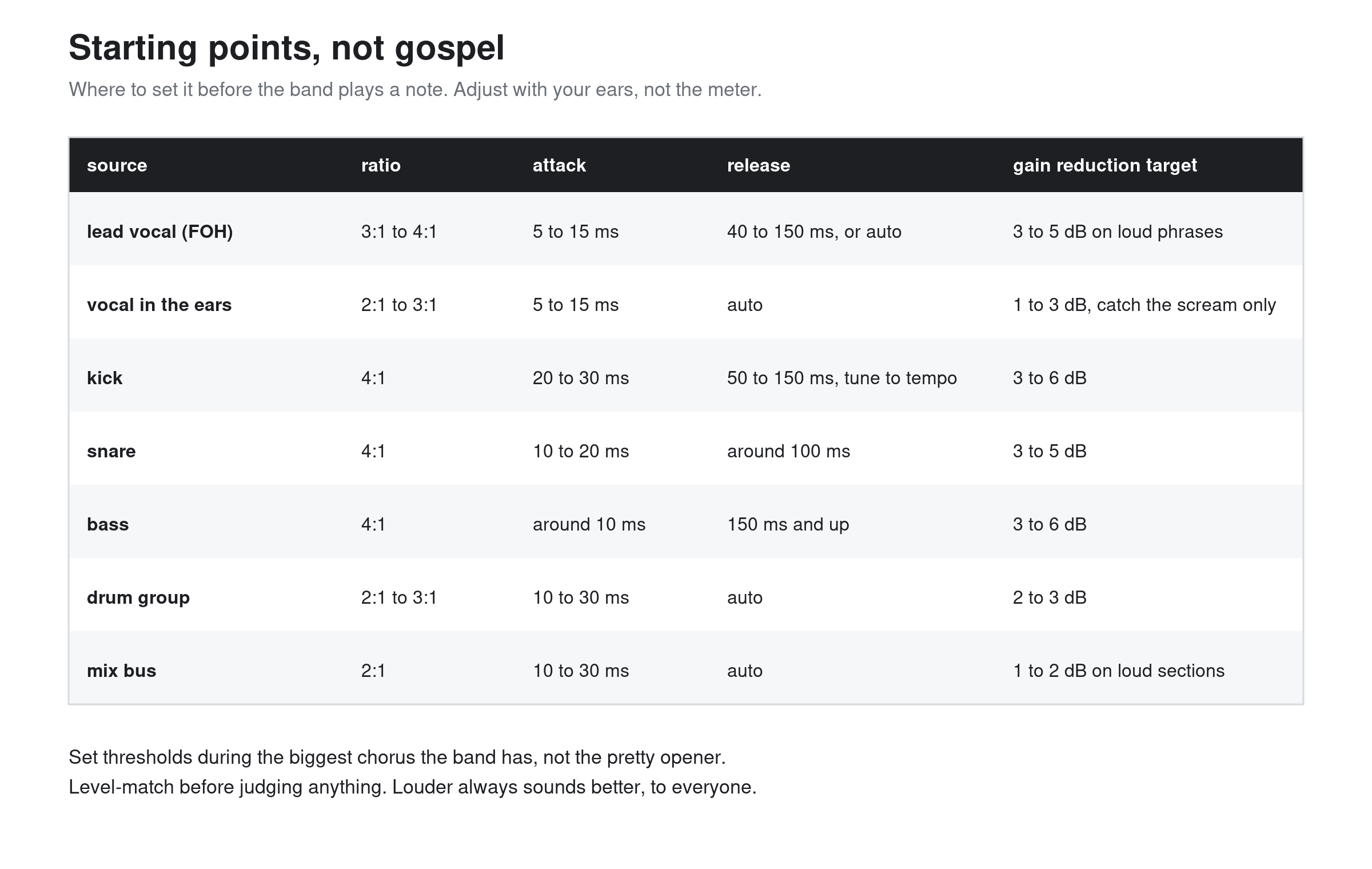
Print it, tape it to the meter bridge, argue with it later.
— Above the Fader
Sources and further reading
- Allen & Heath dLive processing and FX
- Allen & Heath 16T compressor limiter
- Allen & Heath 16VU compressor limiter
- DiGiCo Mustard processing announcement
- DiGiCo Quantum 5
- Yamaha Rivage PM plug-ins
- Yamaha Rivage PM manual: Buss Comp 369
- Yamaha Rivage PM manual: Portico 5043
- Avid VENUE S6L included plugins
- Sonnox live sound plugins for VENUE and S6L